Site Maps for Architects: Types, Formats and How to Make Them
Site maps are the drawings that show a site and its surroundings: buildings, heights, uses, streets, green, water and terrain. Architects use them for analysis, boards and context models. Choose the map by the question it answers, and the file format by the program you will open it in: DWG or DXF for CAD, 3DM for Rhino, SKP for SketchUp, SVG or PDF for Illustrator, GeoJSON for GIS, GLB or STL for 3D.
Last checked: October 2026.
Which site maps does an architect need?
| Map | What it shows | The question it answers |
|---|---|---|
| Figure-ground | Buildings in black, everything else white | What is the grain and density? Where is the open space? |
| Building heights | Footprints shaded or extruded by height | How tall is the context the scheme is judged against? |
| Building age | Footprints shaded by construction year | How old and how protected is the fabric? |
| Land use | Homes, shops, offices, industry, civic | What does the area need and tolerate? |
| Building use | Use of each building | What is next door, floor by floor? |
| Street hierarchy | Roads by type and width | Where do entrances and servicing go? |
| Green and blue | Parks, trees, water | Where are the amenity, ecology and flood risks? |
| Terrain and contours | Ground levels | How do access, drainage and section work? |
| Walking distance | 400 m and 800 m rings or isochrones | What is reachable on foot? |
| Transit | Stops and lines | How car-dependent will the site be? |
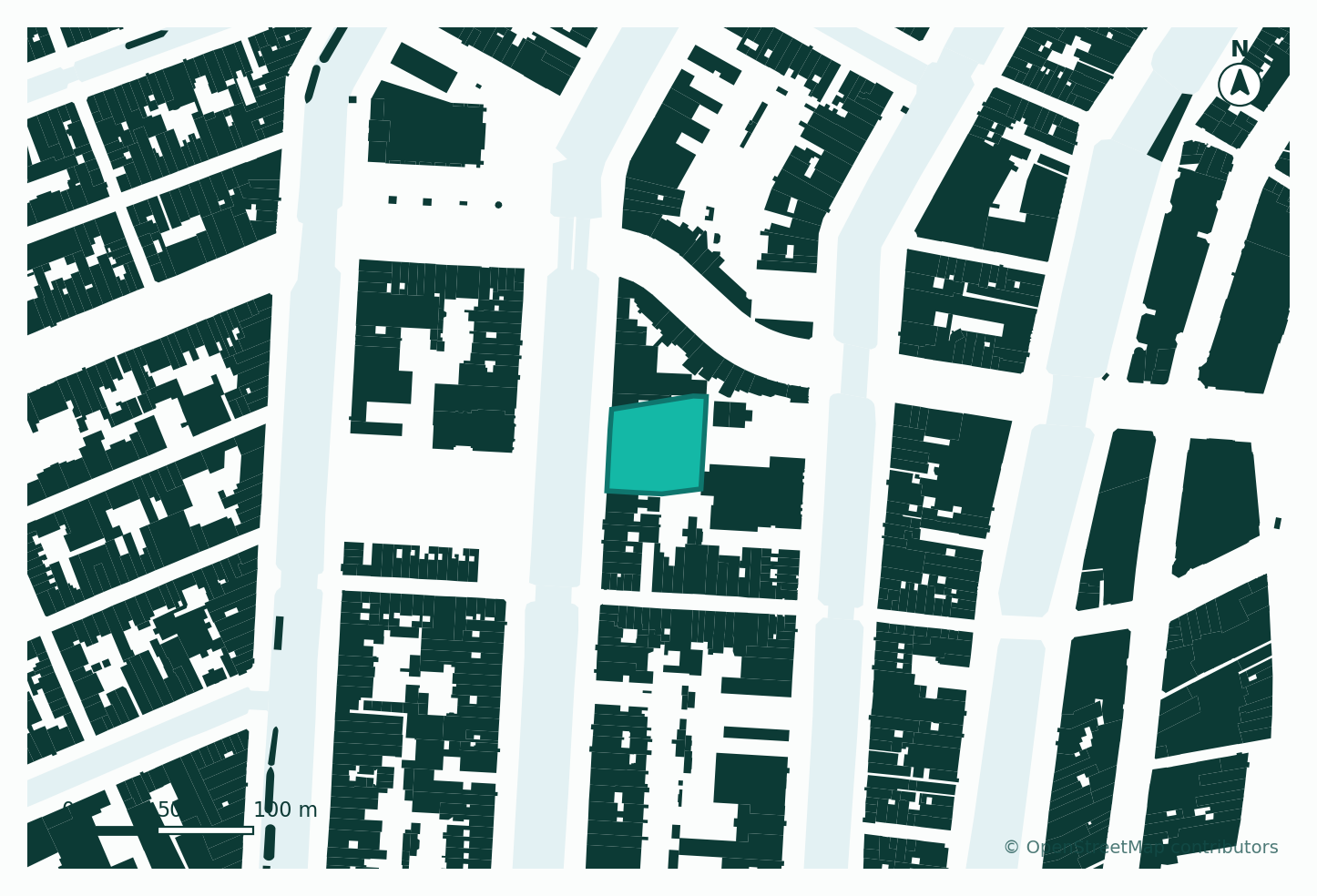
On a real canal site in Amsterdam, the figure-ground showed 501 buildings within 250 m covering 36% of the ground with an average footprint of 141 m²: the narrow canal house, and the reason any new building there should be broken into canal-house widths. The complete site analysis guide works through every map on that site.
Which file format should you use for a site map?
| Program | Best format | Also works | Notes |
|---|---|---|---|
| AutoCAD, BricsCAD | DWG | DXF | Keep the real coordinates; check units are metres |
| Archicad, Vectorworks | DWG or DXF | IFC for 3D | |
| Revit | DWG (linked) | IFC, RVT from some tools | Link, do not import, to keep the model light |
| Rhino | 3DM | DWG, OBJ | 3DM keeps layers and objects named |
| SketchUp | SKP | DWG, OBJ | Large areas get heavy; trim to what you need |
| Blender, Unity, Unreal | GLB or glTF | OBJ, FBX | GLB keeps materials in one file |
| Illustrator, InDesign, Affinity | SVG or PDF | Vector, so line weights stay editable | |
| QGIS, ArcGIS | GeoJSON | KMZ, SHP | Keeps attributes such as height and use |
| Google Earth | KMZ | ||
| 3D printer, laser cutter | STL | SVG or DXF for cutting | Check the model is closed and at scale |
| Presentations, web | PNG | Export at 300 dpi for print |
Raster formats (PNG, JPG) are for viewing only. If you might edit the map, export vector.
How do you make a site map for any address?
There are three routes.
- A web map tool. Search an address, set the area, choose layers, download. Minutes per site. Tools include UrbanEyes Maps, Cadmapper, TopoExport and Cityweft; see the fair comparison of site map tools.
- GIS. QGIS with the QuickOSM plugin downloads OpenStreetMap data for any area; you style and export it yourself. Free and flexible, but takes hours the first time.
- Official data. National mapping agencies and city portals publish base maps and cadastre, often more accurate than open data but in GIS formats you convert. See how to get a DWG site plan for any address.
The free figure-ground map maker, building height map and building age map pages show each map type and open it for your site.
Where does site map data come from?
| Data | Common source | Watch for |
|---|---|---|
| Building footprints | OpenStreetMap, Overture Maps, national registers | Recent demolition and new build may be missing |
| Building heights | OpenStreetMap tags, national LiDAR, estimates | Often estimated from floors; check before daylight studies |
| Building ages | National registers (the Dutch BAG, for example) | Only some countries publish them |
| Land use | OpenStreetMap, land cover such as ESA WorldCover | Coarse outside cities |
| Terrain | SRTM, Copernicus DEM, national LiDAR | Global data is 30 m; national LiDAR can be under 1 m |
OpenStreetMap data must be credited "© OpenStreetMap contributors" on your drawing (ODbL licence).
How do you make site maps look professional?
- One idea per map. A figure-ground with roads, trees and labels on it is no longer a figure-ground.
- Consistent line weights. Site boundary heaviest, buildings medium, context light.
- Scale bar and north arrow on every map, and a stated scale when printed.
- A caption that says what the map shows and what it means for the design.
- The same area and orientation across a set, so maps can be compared.
For layouts, see how to present a site analysis board.
What does UrbanEyes Maps make?
UrbanEyes Maps makes figure-ground, land use, building use and height, roads, green, water and terrain maps for any place on Earth from OpenStreetMap and Overture data, in 14 formats: DWG, DXF, 3DM, SketchUp, GLB, glTF, OBJ, STL, PLY, KMZ, GeoJSON, PDF, SVG and PNG. Exports within a 350 m radius are free and unlimited; larger areas are €2 per site on monthly plans (from €10 a month) or €5 per site pay as you go, with 70% off monthly plans for students.
Frequently Asked Questions
What is a site map in architecture?
A drawing of a site and its surroundings showing what is relevant to the design: buildings, heights, uses, streets, green, water and terrain. Different maps answer different questions.
What is a figure-ground map?
A map that shows buildings as solid black and everything else as white, to reveal the grain, density and pattern of open space around a site.
What file format is best for site maps?
It depends on the program: DWG or DXF for CAD, 3DM for Rhino, SKP for SketchUp, SVG or PDF for Illustrator, GeoJSON for GIS, GLB for 3D software and STL for 3D printing.
Can I make a site map for free?
Yes. QGIS with QuickOSM is free, Cadmapper exports up to 1 km² free, TopoExport has a free tier, and UrbanEyes Maps exports a 350 m radius free without limits.
How accurate are site maps from OpenStreetMap?
In most cities footprints are within a metre or two, which is enough for context at concept stage. Heights are less reliable. For the site itself, use a measured survey.

Chavisha Arora
Co-founder, UrbanEyes
Machine learning engineer, formerly at Tesla and Expedia. Chavisha leads the data and models behind UrbanEyes site analysis.
We analyse, you design.
Run data-backed site analysis with UrbanEyes: maps, metrics, and reports in about 15 minutes.